
🚀 Toloka Not Showing Tasks? Real Reasons + 11 Proven Fixes That Actually Work (2026)
Last Updated: June 2026
Reading Time: 8–11 Minutes
Difficulty: Beginner Friendly
🔍 Why Toloka Shows “No Tasks Available” and How to Fix It
Quick Answer:
If Toloka is showing “No tasks available,” the issue is usually caused by limited task availability, incomplete qualifications, lower accuracy, account trust signals, or timing—not because the platform stopped working.The good news: in most cases, this is temporary and can often improve within a few days after applying the right fixes.
📑 Table of Contents
- Quick Answer: Why Toloka Isn’t Showing Tasks
- Is Your Account Actually in Trouble?
- Why Toloka Is Not Showing Tasks
• Limited Tasks in Your Country
• Low Accuracy Score
• Skipped Training Tasks
• Low Account Trust
• Tasks Fill Up Quickly
• Device Restrictions
• Long Inactivity - Hidden Reasons Most Users Never Notice
- Warning Signs That Need Attention
- 5 Quick Checks Before Trying Any Fixes
- 11 Proven Ways to Fix “No Tasks Available”
• Complete Training
• Improve Accuracy
• Check Multiple Times Daily
• Use Mobile & Desktop
• Increase Account Trust
• Avoid Multiple Accounts
• Work at Better Times
• Focus on One Skill
• Enable Notifications
• Fix Technical Issues
• Complete Your Profile - Best Time to Check Toloka
- How to Increase Future Task Availability
- Build Stability Instead of Depending on One Platform
- Best Toloka Alternatives
- Final Thoughts
- Frequently Asked Questions
- About the Author
🚨 Start Here Before You Panic
You open Toloka.
You refresh the dashboard.
And suddenly…
“No tasks available.”
For many users, this creates immediate concern:
- Is my account banned?
- Did Toloka remove work?
- Is something broken?
In most cases, the answer is no.
Toloka behaves differently from traditional job websites.
You do not receive fixed jobs.
Instead, available tasks change dynamically based on:
✔ Your location
✔ Your quality score
✔ Your language
✔ Your qualifications
✔ Current client demand
✔ Competition from other workers
That means seeing fewer tasks occasionally is completely normal.
If you’re new to the platform:
🧭 First: Is Your Account Actually in Trouble?
Before changing anything, identify your situation.
Quick Diagnosis Table
| Situation | Usually Normal? | Recommended Action |
|---|---|---|
| No tasks for a few hours | ✅ Yes | Check later |
| No tasks for 1–2 days | ✅ Often | Complete training |
| Only low-paying tasks | ⚠️ Sometimes | Improve quality |
| Dashboard mostly empty for 1 week | ❌ Investigate | |
| Qualification access disappeared | ❌ Review account | |
| New account with few tasks | ✅ Common | Build trust |
If your dashboard occasionally shows work—even small tasks—your account is often still healthy.
🔍 Why Toloka Is Not Showing Tasks
There is rarely one reason.
Usually, multiple small factors combine together.
Below are the most common causes.
🌍 1. Limited Tasks in Your Country or Region
This is one of the biggest reasons.
Toloka distributes tasks according to:
- Geographic demand
- Language availability
- Client targeting
- Regional project launches
Two users opening Toloka at the same time may see completely different dashboards.
This is especially noticeable for newer markets.
Related reading:
👉 Why You Are Not Getting AI Jobs
📉 2. Your Accuracy Score Dropped
Quality matters more than quantity.
If the platform detects inconsistent performance:
- Better tasks may disappear
- Qualification access may reduce
- New projects may become unavailable
Common mistakes:
❌ Clicking too quickly
❌ Guessing answers
❌ Ignoring instructions
❌ Inconsistent decisions
Improve your approach:
👉 Increase AI Data Labeling Earnings Fast
🧪 3. You Skipped Training Tasks
This is one of the most common beginner mistakes.
Training tasks often unlock:
✔ Hidden projects
✔ Better earnings
✔ New qualifications
Training is usually not about immediate income.
It is about future access.
⚠️ 4. Your Account Trust Is Still Low
New users often compare themselves to experienced workers.
That comparison is misleading.
Most platforms reward:
- Consistency
- Quality
- Long-term activity
Trust takes time.
Do not judge your account after only a few days.
⏰ 5. Tasks Are Being Filled Extremely Fast
High-paying tasks may disappear quickly.
Sometimes users think no work exists when tasks simply filled before they checked.
Checking once daily is often not enough.
📱 6. Device Restrictions May Hide Tasks
Certain projects may only appear on:
- Mobile devices
- Desktop browsers
- Specific operating systems
Try changing:
✔ Device
✔ Browser
✔ Login session
🔄 7. Long Inactivity Can Reduce Visibility
Inactive accounts may receive fewer opportunities.
Try:
- Logging in regularly
- Completing small tasks
- Staying consistent
Small activity often works better than long inactive periods.
💡 Hidden Reasons Most Users Never Notice
These reasons are rarely discussed—but often matter.
1. You Finished All Beginner-Level Pools
Many beginner tasks are temporary.
Once completed:
- Better quality becomes necessary
- New qualifications unlock growth
- Progress slows temporarily
If you’re starting AI work:
👉 Start AI Data Labeling Jobs (No Experience)
2. Your Skill Growth Stopped
Workers often stay inside one comfortable category.
Long-term growth usually comes from expanding into:
- Search relevance
- Categorization
- Language evaluation
- AI annotation
Build stronger skills:
3. Market Demand Changes Every Week
Task availability changes.
That does not automatically mean something is wrong.
This is why experienced workers diversify.
Compare:
👉 Remotasks vs Toloka vs Clickworker vs Outlier
🚨 Warning Signs That Need Attention
These situations deserve investigation:
1. Possible Quality Issues
- No tasks for 7–10 days
- Training disappears
- Dashboard remains unchanged
2. Possible Account Issues
- Qualification loss
- Submission restrictions
- Missing categories
3. Possible Market Issues
- Seasonal demand drop
- Region limitations
✅ Before Trying Fixes: Do These 5 Quick Checks
Step 1 — Refresh Dashboard
Simple but worth testing.
Step 2 — Complete Training
Training often unlocks hidden work.
Step 3 — Switch Device
Mobile ↔ Desktop
Step 4 — Check Multiple Times
Morning + Evening.
Step 5 — Stay Active for Several Days
Do not evaluate your account after one session.
🏗️ Build Long-Term Stability Instead of Chasing Random Tasks
One mistake many beginners make:
They try to maximize earnings immediately.
Better order:
Phase 1 → Build Trust
Phase 2 → Improve Accuracy
Phase 3 → Increase Speed
Phase 4 → Optimize Earnings
Related:
🛠️ 11 Proven Ways to Fix Toloka No Tasks Available
Now that you understand why Toloka may not be showing tasks, let’s move to the practical solutions.
Most users do not need a new account.
Usually, improving account quality and workflow solves the issue.
✅ 1. Complete Every Available Training Task
Training tasks may look small—but they often unlock future opportunities.
Many users skip them because earnings seem low.
That is a mistake.
Training helps:
✔ Unlock hidden projects
✔ Increase platform trust
✔ Open qualification access
✔ Build account history
Action Plan
- Open training regularly
- Finish instructions completely
- Avoid rushing
🎯 2. Improve Accuracy Before Trying to Earn More
One hidden reason users stop seeing tasks:
They focus on speed instead of quality.
Toloka rewards consistency.
Better Approach
❌ Faster submissions
✅ Better decisions
Do this:
- Read instructions fully
- Avoid guessing
- Stay consistent
Improve long-term growth:
👉 Increase AI Data Labeling Earnings Fast
🔄 3. Check Toloka Multiple Times Per Day
Tasks appear throughout the day.
Checking once and leaving may cause missed opportunities.
Suggested Routine
| Time | Recommended |
|---|---|
| Morning | Quick check |
| Afternoon | Moderate |
| Evening | Active |
| Late Night | Test availability |
Do not refresh continuously.
Build a sustainable routine.
📱 4. Use Both Mobile and Desktop
Some projects appear differently depending on device.
Try:
✔ Chrome
✔ Mobile app
✔ Desktop browser
Switching devices sometimes reveals additional tasks.
📈 5. Increase Account Trust Signals
Platforms reward predictable behavior.
Trust improves when you:
- Stay active
- Submit quality work
- Maintain consistency
Build Trust Faster
Week 1 → Learn
Week 2 → Improve
Week 3 → Optimize
🚫 6. Avoid Creating Multiple Accounts
If tasks disappear, creating another account may create bigger problems.
Instead:
✔ Improve existing account
✔ Build history
✔ Stay consistent
🌙 7. Work During Better Availability Hours
There is no universal schedule.
But many workers test:
Suggested India Timing
- 8 PM–11 PM
- 11 PM–2 AM
Experiment and track results.
🧠 8. Focus on One Skill Category
Instead of random tasks—
specialize.
Examples:
- Search evaluation
- AI labeling
- Categorization
- Language evaluation
Improve skill growth:
🔔 9. Enable Notifications
Do not depend entirely on manual checking.
Notifications help you react faster.
🧹 10. Fix Technical Issues
Try simple fixes first:
✔ Update browser
✔ Clear cache
✔ Re-login
✔ Restart app
Small technical issues sometimes affect visibility.
🌐 11. Complete Your Profile Properly
Many users leave profile sections incomplete.
Improve:
- Languages
- Device access
- Skills
- Categories
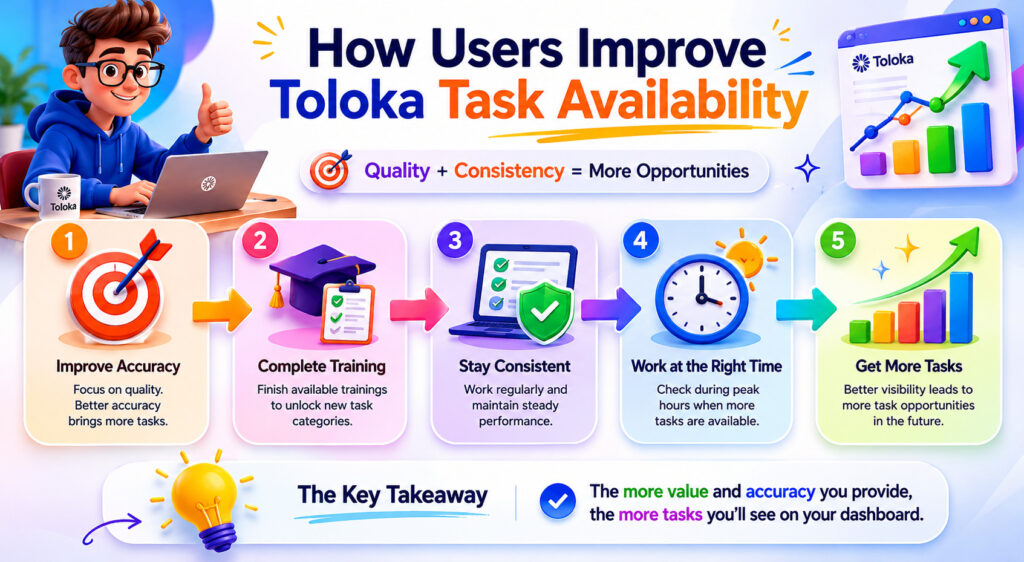
🕒 Best Time To Check Toloka
There is no guaranteed schedule.
But users often experiment with this pattern.
| Time | Competition | Opportunity |
|---|---|---|
| Morning | Medium | Medium |
| Afternoon | Medium | Medium |
| Evening | High | High |
| Night | Lower | Variable |
Treat this as testing—not a promise.
📈 How To Increase Future Task Availability
Getting tasks once is good.
Keeping tasks available matters more.
Focus on this sequence:
Stage 1 → Accuracy
↓
Stage 2 → Trust
↓
Stage 3 → Qualifications
↓
Stage 4 → Earnings
This usually works better than chasing short-term payouts.
Helpful reading:
👉 AI Data Labeling Daily Routine – Earn Consistently
👉 AI Jobs Payment Daily Weekly Monthly
🌱 Build Stability Instead of Depending on One Platform
One of the biggest beginner mistakes:
Waiting for one platform.
Professional remote workers diversify.
Recommended:
👉 AI Data Labeling Jobs Without Investment
👉 Highest Paying AI Data Labeling Jobs
🔄 Best Alternatives If Toloka Stays Slow
If availability remains limited, diversify.
Hive Micro
Neevo
Microworkers
Zlanze
👉 Low Risk Zlanze Jobs For Beginners
More:
🎯 Final Thoughts
Seeing “No Tasks Available” on Toloka does not automatically mean your account has a problem.
In most situations, the issue is connected to:
✅ Accuracy
✅ Qualifications
✅ Competition
✅ Timing
✅ Regional demand
The goal should not only be getting more tasks today.
The better long-term strategy is:
Build quality → Build trust → Build skills → Build income stability
Small improvements often create better opportunities over time.
🙋 Frequently Asked Questions
Q1. Why does Toloka suddenly show no tasks?
Usually because of:
- Regional availability
- Qualification limits
- Lower account quality
- Increased competition
- Task demand changes
Temporary shortages are common.
Q2. How long does Toloka take to show tasks again?
There is no fixed timeline.
Many users see improvement within:
- 24–72 hours
- After completing training
- After improving consistency
Q3. Does completing training increase Toloka tasks?
Often yes.
Training may unlock:
✔ Hidden projects
✔ Better opportunities
✔ Qualification access
Q4. Is Toloka worth continuing if tasks are low?
That depends on your goals.
If Toloka becomes inconsistent:
- Continue improving quality
- Diversify platforms
- Avoid depending on one source
Read:
👉 Is AI Data Labeling Worth It
Q5. Should I create another Toloka account?
Usually no.
Multiple accounts may create more problems than solutions.
Improving one account is generally safer.
Q6. What if I want more stable remote income?
Consider building skills and expanding beyond one platform.
✍️ About the Author
RemoteBridge AI
RemoteBridge AI publishes beginner-friendly guides focused on:
✔ AI data labeling jobs
✔ Microtask platforms
✔ Remote work opportunities
✔ Earning optimization strategies
Content is created to simplify complex platform decisions and help users avoid common mistakes.
Explore more:
Browse everything: